REVIEW · VIENNA
Vienna Audioguide – TravelMate app for your smartphone
Book on GetYourGuide →Operated by MyWoWo Srl · Bookable on GetYourGuide
Vienna sounds better when you control the pace. This TravelMate smartphone audioguide lets you explore Vienna at your own speed with no paper tickets to collect, and you can listen online or download for offline. I especially like that the audio doesn’t expire and you can replay it anytime within the validity window, and that you can also read the text in the app when you want a slower, clearer way to take it in. The only real drawback: it’s not a live guide, so you’ll miss the spontaneous back-and-forth you’d get on a walking tour.
What you get is essentially a well-produced “side guide” in your pocket: professionally created audio, interpreted by TV and radio professionals, plus a quiz section to keep you paying attention. You also use your own phone and earphones, which means no borrowing equipment from a third party. Still, if you’re the type who likes deep Q&A on the spot, pair this with at least one in-person tour day so you don’t feel like you’re only getting one-way information.
The best part for most people is the freedom. There’s no meeting point—you start wherever you want after activating the code—and the guide covers major sights across central Vienna and beyond. At this price, it’s one of those add-ons that can quietly turn into your main plan for at least a couple of days.
In This Review
- Key things to know before you press play
- Vienna Audioguide TravelMate: why this beats a random audio download
- Price and value: $7 for a guide you can reuse for years
- Download and activation: getting started without the hassle
- How the audio works: offline, text, and the quiz that keeps you awake
- Your Vienna highlight path (as the app presents it)
- Vienna Introduction: set your bearings before you hit the streets
- Local cuisine: food stories you can use while walking
- Stephansdom: the kind of landmark that rewards a pause
- Hofburg and Maria-Theresien-Platz: imperial scenery with audio context
- Kunsthistorisches Museum: museum time without the full commitment
- Belvedere and Vienna State Opera: arts and architecture with guided stories
- Schönbrunn and Volksgarten: a more expansive pace
- Parliament and Rathaus, plus Prater: city power and open-air time
- Secession building and Karls-Kirche: contrast that feels smarter with audio
- Albertina Museum and MuseumsQuartier: ending with learning-friendly stops
- Is this better than a live tour, or should you pair them?
- Languages and your comfort level
- Who should book the Vienna TravelMate audioguide
- Should you book it?
- FAQ
- How much does the Vienna Audioguide cost?
- How long is the audioguide content?
- Does the audioguide expire?
- Can I listen offline?
- Is there a meeting point?
- What languages are available?
- Can I read the audio content instead of only listening?
- Where do I find the activation code?
- Is it wheelchair accessible?
- Can I cancel for a refund?
Key things to know before you press play

- No paper tickets: you download, activate, and go straight to the streets
- 43 audio files, 129 minutes total: enough time to learn without dragging on forever
- Offline and online listening: useful when data is pricey or signal is spotty
- Text option + earphones: you can switch styles when audio alone isn’t enough
- Quiz section: short questions to test what you picked up
- Wheelchair accessible: designed for easier independent use
Vienna Audioguide TravelMate: why this beats a random audio download

This isn’t a “spray and pray” set of recordings. The TravelMate Vienna audioguide is designed around autonomy: you choose when to start, where to stand, and how long to spend at each place. If you like roaming, pausing for photos, or taking breaks for coffee, this format works with you instead of forcing a schedule.
The guide is built to feel like you have a tourist guide beside you, but without the awkward moment of trying to catch up with a group. It covers history, points of interest, and curiosities, and it’s professionally produced. You’re not relying on someone speaking with a shaky mic right off a balcony—you’re listening to polished audio interpreted by media professionals.
And because you can read the text of the audio files in the app, you’re not stuck if you’d rather skim key ideas or double-check a detail. That’s a small feature, but it changes how usable an audioguide feels in real life.
You can also read our reviews of more tours and experiences in Vienna



Price and value: $7 for a guide you can reuse for years
At $7 per person, the value is strong because you’re not paying for a one-time interaction. The guide is valid for 1035 days from your first activation, and the audio is described as usable many times and not expiring in the normal “use it once” way.
Think of it like buying access to a learning layer you can repeat. Maybe you’ll play a few tracks on your first day, then replay sections on your second visit to connect the dots. Or you’ll start late and still catch up because you’re not racing a group’s end time.
Also, you control the pace, so you don’t waste money sitting through gaps. If you only want 60 minutes one day, you can do that. If you’re energized and want all 129 minutes across the highlights, you can.
Download and activation: getting started without the hassle

There’s no meeting point. The experience is tied to your smartphone, so once you have the app, you can start wherever you prefer.
To begin, you install the TravelMate app:
- For Android, download the app called TRAVELMATE from the Play Store
- For iOS, download TRAVELMATE TM from the App Store
Your activation code comes in your email. You’ll need to look for the activity details area (or show tickets), then find the barcode in the orange frame. The code is the 10-digit small number under the barcode. If you use the GetYourGuide app, the activation barcode and code are shown there as well.
One practical advantage here: no paper ticket pickup. That matters in cities where you might be walking fast and changing plans. You’re not chasing a counter or trying to decode a “where do I collect it?” moment.
How the audio works: offline, text, and the quiz that keeps you awake

The audioguide includes 43 audio content pieces, for a total length of 129 minutes. That means you’re not stuck listening to one endless track. You can jump in, listen to the part relevant to where you are, then move on.
You can listen online or offline. Offline is the big win for a self-guided day: you’re not depending on data coverage every time you move into a plaza or near a building with weaker reception.
You can also read the text of the audio files in the app. In practice, this helps in two ways:
- When you miss a line because you were looking up
- When you want to slow down and confirm what you just heard
There’s also a quiz section with short questions about the city. It’s not meant to replace curiosity—it’s meant to wake up attention. If you tend to drift while walking, a quick quiz can snap you back into “paying attention mode.”
And yes, earphones are recommended. For a city day, that’s the difference between enjoying the guide and turning it into background noise you can’t really follow.
Your Vienna highlight path (as the app presents it)

The guide covers a set list of major sights across Vienna:
Vienna Introduction; local cuisine; Stephansdom; Hofburg; Maria-Theresien-Platz; Kunsthistorisches Museum; Belvedere; Vienna State Opera; Schönbrunn; Volksgarten; Parliament and Rathaus; Prater; Secession building; KarlsKirche; Albertina Museum; MuseumsQuartier.
The key is that this isn’t just a sightseeing checklist. The app is described as giving you context for what you’re seeing—history, points of interest, and curiosities—so you’re not staring at buildings without any story.
Below is how I’d think about the day if you follow the audio sequence: what each stop likely does for your understanding, what you’ll enjoy most, and one consideration for each.






Vienna Introduction: set your bearings before you hit the streets

Start with Vienna Introduction if you want the best payoff later. When the guide begins with a foundation, it makes the rest easier to follow because you have a mental framework.
You’ll hear about the city and how the audio pieces connect to the places you’ll visit. If you’re the type who likes to understand the “why” behind the “what,” this opening track can make the whole experience feel more coherent.
My only caution: don’t treat the introduction like homework. If you’re already comfortable with Vienna, you can start with the landmark nearest to where you’re standing, then loop back to the introduction later.
Local cuisine: food stories you can use while walking

Next up is The Wonders of Local Cuisine. Even without knowing what’s coming, food-focused audio is a smart move because Vienna isn’t only a sightseeing city—it’s also a city you experience through meals.
This track should help you connect what you’re eating with how Vienna’s culture shaped itself over time. And since the guide is independent, you can pause to grab a snack and keep the audio going when you’re ready.
Consideration: cuisine talks are great for inspiration, but you’ll still need to choose where to eat. The app helps you understand context; it doesn’t replace your on-the-ground decision-making.
Stephansdom: the kind of landmark that rewards a pause

Then you hit Stephansdom. Big, recognizable churches can be impressive even when you don’t know much, but the value of an audioguide is that you get more meaning per minute.
For this stop, expect the audio to explain history plus points of interest and curiosities related to the building. The practical win is you can stand still, listen, and stop guessing what you’re looking at.
One drawback to watch for: church exteriors and entrances can be busy. If you’re visiting at a peak time, plan to listen in short bursts and step aside when you need space.
Hofburg and Maria-Theresien-Platz: imperial scenery with audio context

The sequence continues with Hofburg and Maria-Theresien-Platz. These areas tend to look like “Vienna on a postcard,” but the app’s role is to give you explanations so it’s not just scenery.
You’re likely to get a mix of historical framing and curiosity details: why these places matter, what makes them notable, and what to pay attention to while you’re walking around.
Consideration: if you only have a short time window, don’t try to cram everything into one sprint. Let the audio pace your stops—otherwise you’ll listen to the words while your eyes move faster than your brain can absorb.
Kunsthistorisches Museum: museum time without the full commitment
Next is Kunsthistorisches Museum. Even if you don’t go inside, museum districts are ideal for audio because you can learn from the outside too—what you’re seeing, why it’s considered important, and what to notice.
If you do go in, having the audio beforehand (or during) can make the visit feel less random. If you don’t go in, you still get useful context that helps the area make more sense.
One consideration: museums often take time. The app covers a spot, but your actual visit length depends on your interests and how much you want to read and look.
Belvedere and Vienna State Opera: arts and architecture with guided stories
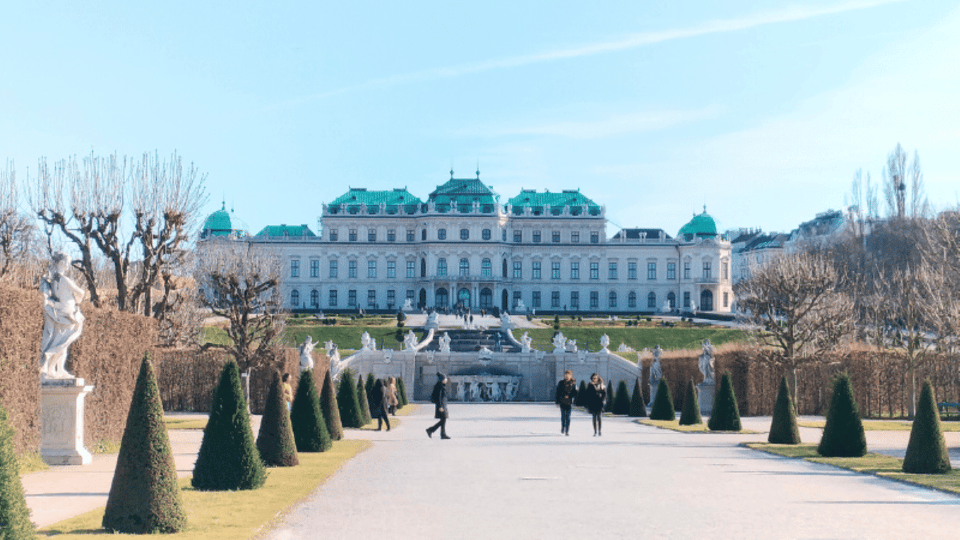
The app then moves through Belvedere and Vienna State Opera. These are classic Vienna cultural stops, and audioguide audio is a good fit because it can connect the place to stories instead of leaving you with only visual impressions.
With independent audio, you can stay near an overlook for as long as you want and not feel like you’re holding up anyone else. You can also replay sections if you want a second pass on the history or curiosities after you’ve looked around.
Consideration: if you’re already planning a lot of formal visits, manage your day so you’re not rushing between major sights. Audio works best when you give it a chance to land.
Schönbrunn and Volksgarten: a more expansive pace
Next comes Schönbrunn and then Volksgarten. Places like this tend to ask for walking. The benefit of the TravelMate approach is that it matches that reality—you can listen while you move, and stop when you want.
Expect the audio to cover history, points of interest, and curiosities tied to each area. That helps you read the landscape and architecture with a purpose.
A practical consideration: large sites can turn into long days. If you feel yourself getting tired, use the audio as a guide for where to focus instead of trying to “complete everything.”
Parliament and Rathaus, plus Prater: city power and open-air time
Then the guide covers Parliament and Rathaus, followed by Prater. This combination is nice because it alternates what you’re focusing on: civic buildings and public spaces, then a more open-air vibe.
The audioguide approach helps here because you can listen while you stand in the right spot for observation. You’re not just passing through; you’re learning while you’re there.
Consideration: civic areas can be easier to view quickly than parks or larger entertainment zones. If Prater is on your agenda, consider giving it enough time so the audio doesn’t become something you squeeze in.
Secession building and Karls-Kirche: contrast that feels smarter with audio
Next are the Secession building and Karls-Kirche. The fun of switching between different styles is that it keeps your attention. With audio, you also get a guided explanation of what you’re seeing, rather than guessing how the buildings relate to Vienna’s story.
This is a good segment for using both audio and text. If you want the spoken part plus a clearer written reference, this is where that option helps most.
Consideration: if you’re walking in a hurry, you might miss the “curiosities” part. Slow down slightly for at least one of these stops so you don’t just hear words—you actually connect them to views.
Albertina Museum and MuseumsQuartier: ending with learning-friendly stops
Finally, the app leads you to Albertina Museum and MuseumsQuartier. Ending your guide at museum-heavy areas makes sense: these places naturally reward curiosity, and audioguide context can help you decide what to focus on.
Even if you don’t spend hours inside, the audio can make the overall area feel less confusing. You’ll have a sense of why people come here and what kinds of details might matter.
One practical consideration: museums can stretch your time. If you have a tight evening, plan to save energy for the last stop so you don’t rush the learning parts.
Is this better than a live tour, or should you pair them?
This is where I think the TravelMate app shines most: it complements other plans. A live guide gives you real-time answers and you can ask follow-up questions. The audioguide gives you control and replay value at a lower cost.
One review note that matches my advice: the audioguide is great for getting an overview fast, but it doesn’t replace a real guide if you want the human touch. For a smart strategy, consider doing the audioguide on your own days and adding one guided tour on a day when you want deeper interaction.
Languages and your comfort level
The guide is available in Chinese, English, French, German, Italian, Russian, Spanish. If you want the best experience, pick the language you’re most comfortable hearing for longer stretches. Audio works like a flow—if you switch languages mid-day, it can interrupt your focus.
Wheelchair access is listed, which is helpful if you need a plan that supports independent movement.
Who should book the Vienna TravelMate audioguide
Book it if:
- you want total autonomy and hate collecting paper tickets
- you like listening in short segments while you walk
- you want offline audio options
- you want something you can replay within the 1035-day validity window
- you’re traveling with someone who wants different pacing, since there’s no group to match
Consider skipping or pairing it if:
- you only want a single “guided” day and don’t want to think at all about what you’re doing next
- you prefer Q&A and spontaneous explanations
- you expect a live guide’s interaction (this is strictly self-guided audio)
Should you book it?
Yes, if you want a value-packed way to learn Vienna without locking yourself into a rigid schedule. For $7, 129 minutes total across 43 pieces, plus offline listening and a text option, is a practical deal—especially if you plan to see multiple major sights anyway.
I’d book this as the backbone of one or two sightseeing days, then add a live guided tour only if you crave interaction. That combo gives you the best of both worlds: independence plus the human storytelling when it matters most.
FAQ
How much does the Vienna Audioguide cost?
It’s priced at $7 per person.
How long is the audioguide content?
The app includes 43 audio content pieces totaling 129 minutes.
Does the audioguide expire?
It’s described as not expiring, and the validity is listed as 1035 days from first activation.
Can I listen offline?
Yes. You can listen to the audio guide online or offline.
Is there a meeting point?
There is no meeting point listed. You start your experience straight away after downloading and activating the app.
What languages are available?
Chinese, English, French, German, Italian, Russian, and Spanish.
Can I read the audio content instead of only listening?
Yes. You may read the text of the audio files in the app.
Where do I find the activation code?
In the email, open Show activity details or Show your tickets here, then use the barcode frame to find the 10-digit code under the barcode. You can also find it via the GetYourGuide app ticket view.
Is it wheelchair accessible?
Yes, the activity is listed as wheelchair accessible.
Can I cancel for a refund?
Free cancellation is available up to 24 hours in advance for a full refund.